Event software · weddings, quinceañeras, graduations and company dinners
Your guest list, their RSVPs and your table plan, all in one place
One guest list. Everything else comes from it.
Each guest confirms from their own link, picks a menu and writes down their allergy. You print three sheets: the DJ's, the kitchen's and the table plan. No counting by hand, no asking twice.
It works the same whether the event is yours or you make a living running other people's. The difference is the price, and it's further down.

How it works
Four steps, from the list to the day of the event
Everything you see below is the product running, taken from the sample wedding. None of it is drawn.
-
Step 1
You load your guest list
You import your spreadsheet or your CSV —the one you already have, with whatever name you gave it— or you type them in one by one. Every row carries its group, its plus-ones and its contact details.
From here on the list lives in one single place. There is no version in your mother's chat and another one in the caterer's inbox.
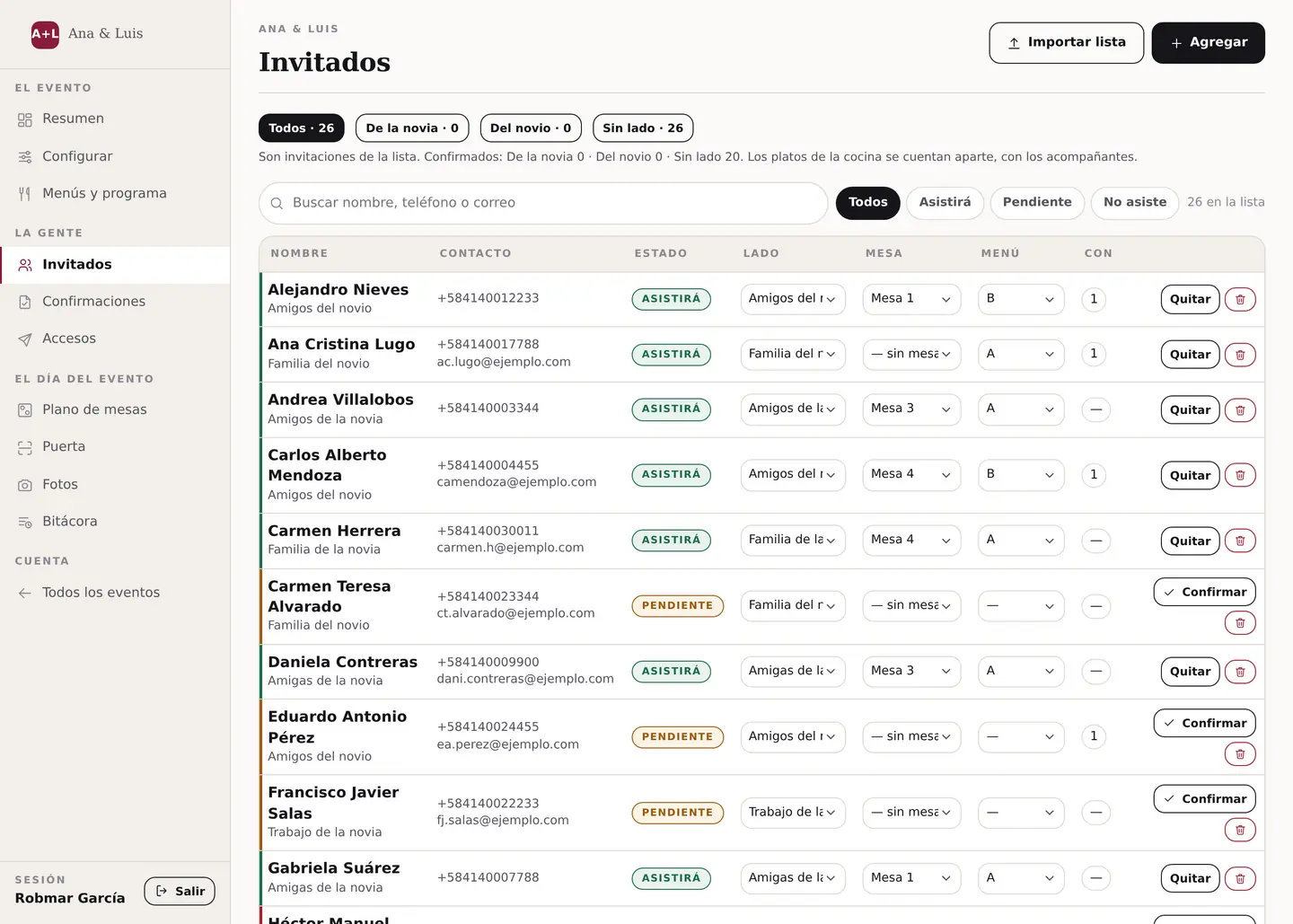
The guest list. Everyone with their status —coming, pending, not coming—, their table, their menu and how many they bring. You filter it and search by name, phone or email. -
Step 2
Each guest RSVPs from their own link
You send them a digital invitation with RSVP over WhatsApp. They open it —no sign-up, no password, nothing to install—, say whether they are coming and with how many, pick their menu, write down their allergy and request their song.
You write nothing down: that lands straight in the list from step 1.
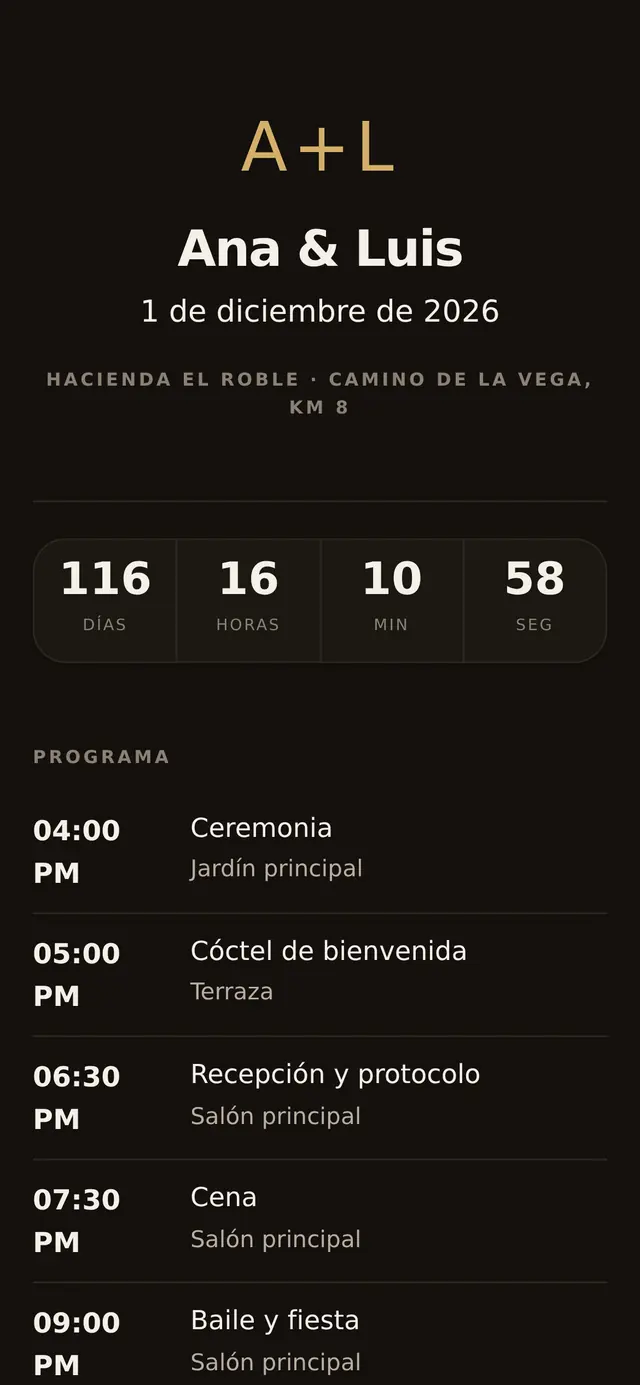
What your guest receives. This is not a picture: it is the sample wedding's invitation, open right now. Touch it. 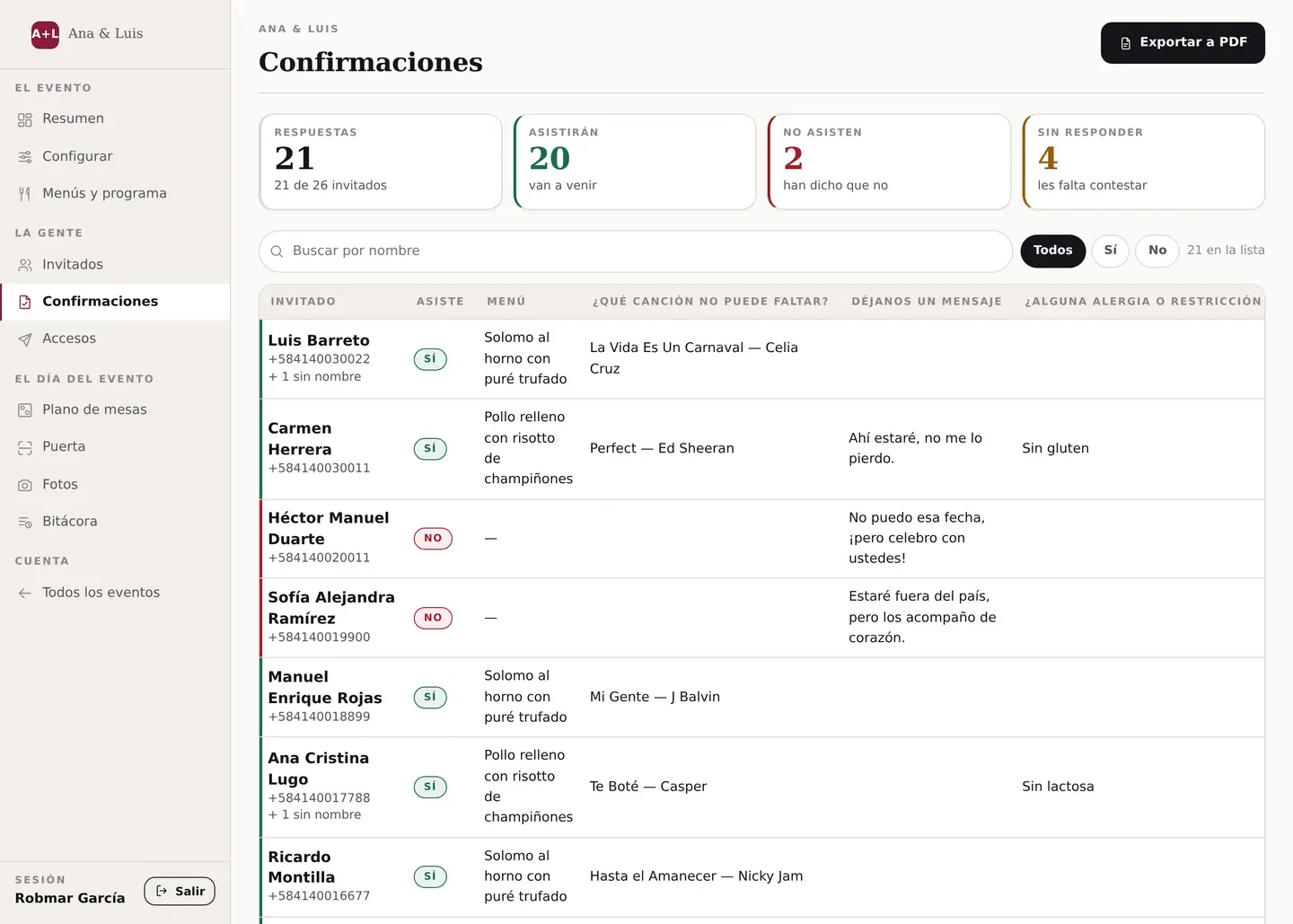
And what comes back to you: who is coming, what they eat, which song they asked for, what they wrote you and what they cannot eat. All in the same table. -
Step 3
You seat everybody on the table plan
You put the tables, the dance floor, the bar and the stage where they really are, and you drag people with your finger. The table changes color depending on whether it is full, half full or empty.
When somebody cancels you drop them and that is it. There is no redoing the whole plan, and the setup floor plan comes out updated.
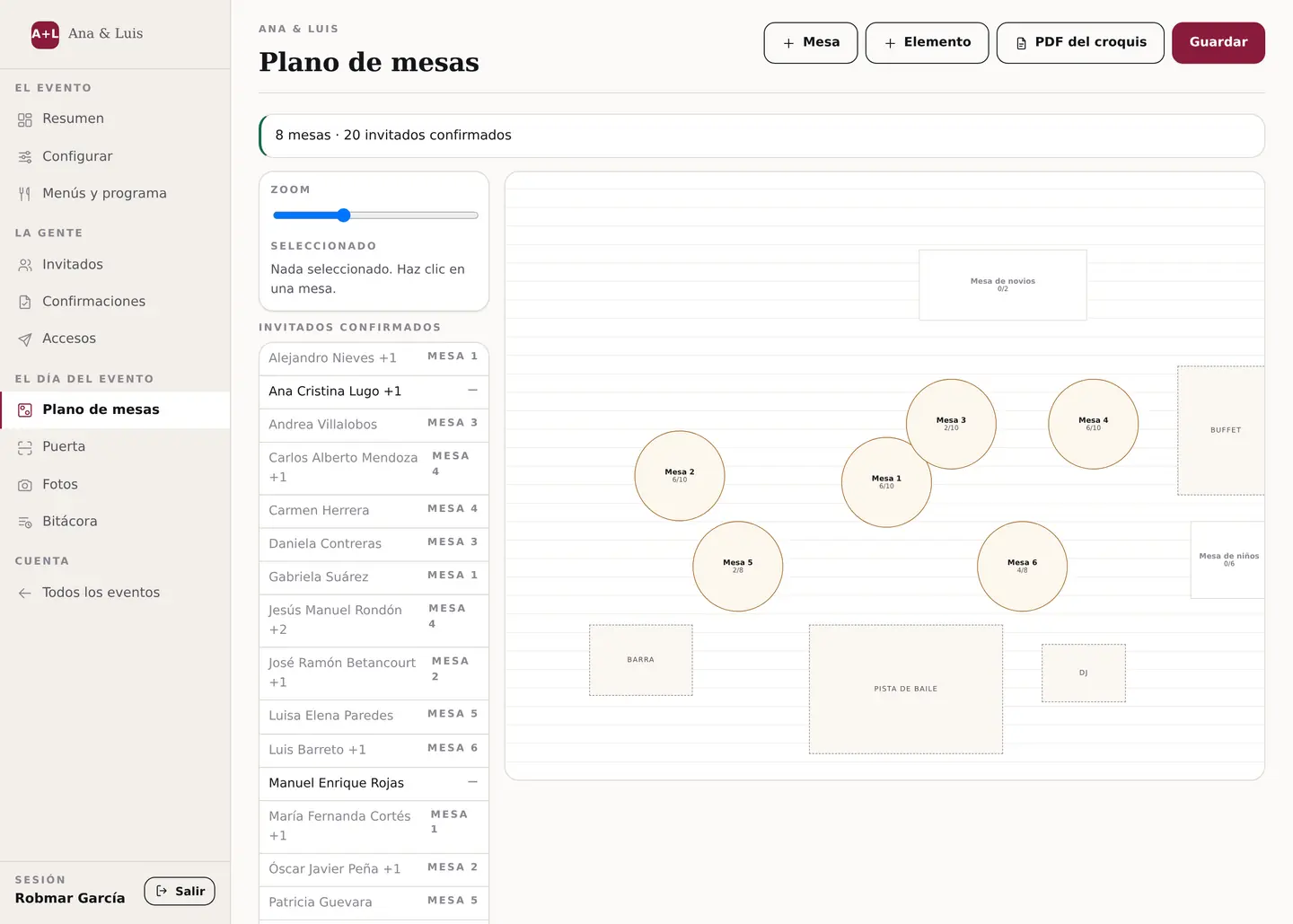
The sample table plan: eight tables, the head table, the kids' table, the buffet, the bar, the dance floor and the DJ. On the left, the confirmed guests who do not have a chair yet. -
Step 4
You print the three sheets and run the door
The day before you pull the three PDFs —DJ, kitchen and setup— and hand one to each supplier. They come out of the same data: if the plan says 102, the kitchen order says 102.
On the day you open the door screen, scan the guest's code and their arrival is recorded. Anyone turning up with a dead phone battery you find by name.
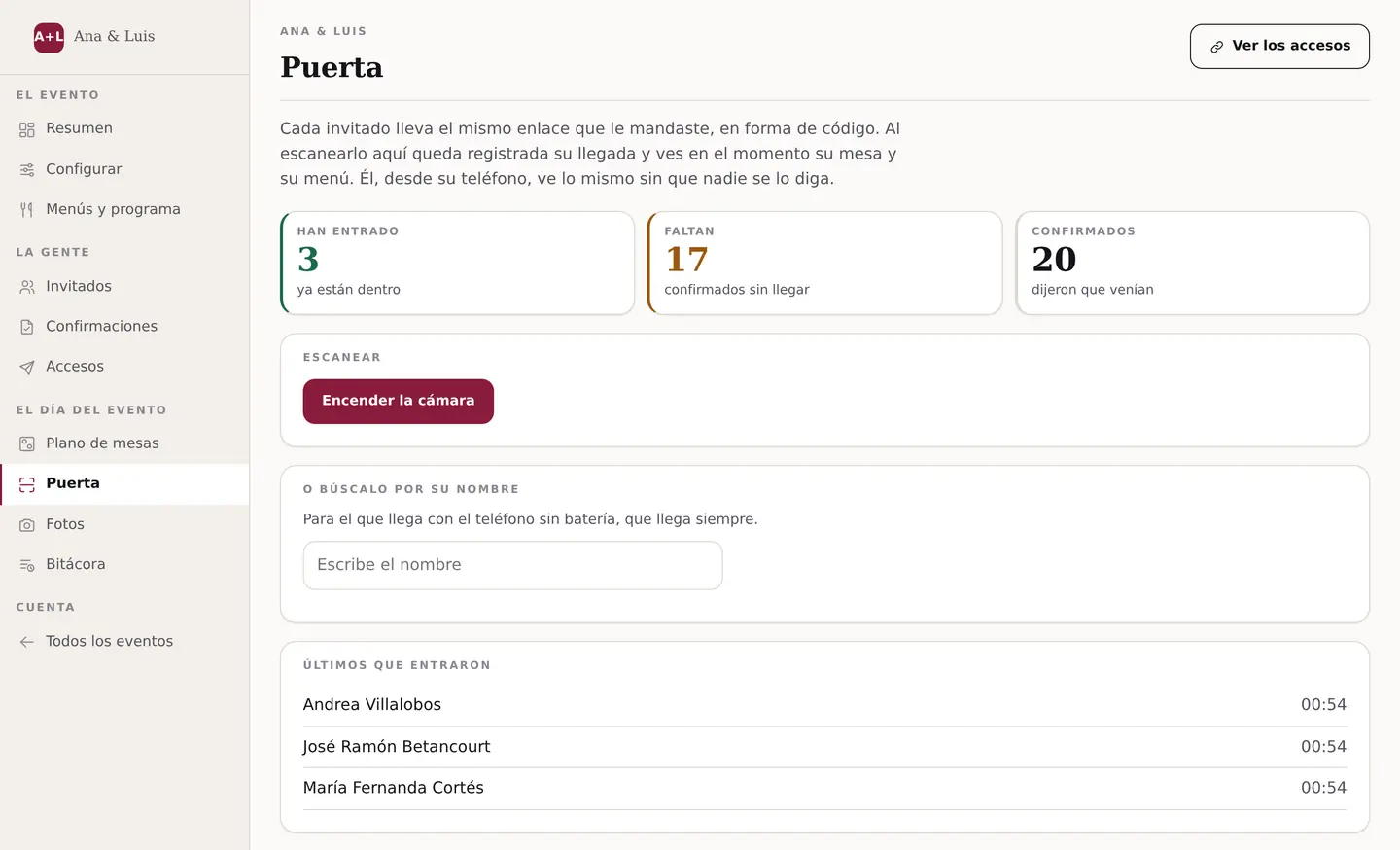
The door, on the phone of whoever is receiving. How many are in, how many are missing, the scanner and the name search for whoever arrives without their link.


The pain
Everyone calls this “the Thursday”
It is not the day of the event. It is the Thursday before, when you have to give the final number. That day the list lives in five places and none of them agree: the spreadsheet, the chat with your mother, the Google form, the loose messages and the notebook. And out of that comes a number somebody is going to bill you for.
If the event is yours
- You have spent three weeks writing to the same people. Twelve of them have said nothing and you no longer know whether asking again is nagging.
- You have to give the dinner count on Friday and you are counting heads from memory.
- You started at 160 and you are at 120, and every drop-out makes you redo the whole seating.
- Three cousins are bringing someone who was not on the list, and your aunt does not eat gluten but she told you that in a voice note back in March.
- And the tables: keeping apart the ones who do not speak, leaving nobody on their own, and the venue wants groups of exactly eight to ten.
If you run them for a living
- Your coordinator has spent six hours on this event chasing confirmations that are not hers.
- The client sends you list_v7_FINAL_ok.xlsx on Thursday at eleven at night, and you had already passed v5 to the caterer.
- Saturday at eight the setup crew turns up with a printed plan that no longer holds, and fixes it in pen in front of the guests.
- The DJ asks you on WhatsApp which songs those were, and they are scattered across a chat from a month ago.
- On Monday the caterer bills you 116 plates, 102 walked in, and that argument is yours, not the client's.
None of this is an organization problem. It is that the list and the tables and the menus live in different places, and somebody has to cross them by hand every time something changes. That somebody is you, always on a Thursday.
The proof
The three PDFs each supplier walks off with: DJ, kitchen and setup
On Saturday every supplier turns up with their sheet in hand. What you are looking at are the three PDFs from the sample wedding, exactly as they come out. They are not mockups: you can download them and open them.

For the DJ
The list of songs your guests asked for, and who asked for each one. Which means: the DJ stops writing to you, and your cousin's private message and her phone number do not show up on that sheet.
Download this sample PDF →
For the kitchen
How many plates of each menu —counting plus-ones— and the allergies with names on them. Which means: no more “I think it is about forty”, and if tomorrow there is an argument about what was flagged, it is written down and dated.
Download this sample PDF →
For the setup crew
The table plan and who sits at each one. Which means: you print it and tape it to the kitchen door, and the crew does not set up from last week's version.
Download this sample PDF →All three come out of the same data. Change one table and all three change. That is the whole product.
The money
The plate of the one who said yes and did not come, you pay for anyway
The final number is handed in two or three days ahead, and you are billed the higher of what you guaranteed and who walked in. Every no-show is already paid for before the music starts. Do your own math:
That is what you already paid. Giving the exact head-count does not get all of it back, but it stops being a guess.
If the event is yours
In Spain a guest costs 225 euros on average. In Venezuela catering runs about 120 dollars a head. Those are the two markets we have a figure for, and neither of them is yours: the calculator above uses your own. Ten no-shows are not ten chairs, they are the whole music line or the whole photography line.
If you run them for a living
They do not bill you, but they do come to you about it. The Monday conversation with the caterer and with the client is yours, and today you have it with no sheet of paper to show. With Garvela the count comes out of the same data as the tables: if the plan says 102, the kitchen order says 102.
225 EUR per guest is a Spanish figure: Informe del Sector Nupcial 2026 by bodas.net, published on 11 March 2026 over 2,100 couples married in 2025. It is not a US average and we are not going to dress it up as one. Venezuela: national press, February and May 2025; round number, not audited. The calculator uses your numbers, in whatever market you work in: we do not put in an invented no-show rate.
Who it is for
Event planning software for planners, for venues and for whoever is getting married
It is the same program for all three. What changes is what it takes off your hands and how much it costs.
Venue, hall or country estate
You hand it over set up and stop chasing lists
- Every wedding that walks through your door already comes with its list, its plan and its head-count.
- The caterer gets a number, not a conversation.
- With your logo on the invitation and on the three sheets. Or with your whole brand, if you take the white label.
- You can charge the client for it as an extra of yours.
Event planner · wedding planner
You stop building every event from scratch
- However many events you run in a year, with no limit and no cap on guests.
- You import the client's list from their spreadsheet, whatever they called it.
- Your coordinator stops chasing confirmations that are not hers.
- When the caterer argues on Monday, you have the sheet with the time and the date.
Your wedding, your quinceañera, your graduation
You ask once and you do not ask again
- You send the link on WhatsApp and the answers land on their own.
- Every guest sees their table, their plate and the wifi password; nobody sees your list.
- On Thursday you give a number that comes from one place, not from memory.
- You start free, with one event and up to 60 guests, no card.
Weddings, quinceañeras, graduations, christenings and company dinners
It is built on “event”, not on “wedding”. A quinceañera and a graduation with two hundred families work exactly the same: what changes is the wording and which modules you switch on. The only real difference is the size of the list, and there is no cap.
In a minute
Where it hurts depends on who you are
Three short pieces. Everything on screen is the real product, recorded from the sample event. Pick yours. The voice-over is in Spanish — the screens speak for themselves, and an English version is coming.
Five lists for the same event, none of them match · 1:13
Ten days out, thirty people have not replied · 1:03
Two hundred families, tables of ten and a sheet of graph paper · 1:01
What your guest sees
The same invitation. Two guests. Two different screens.
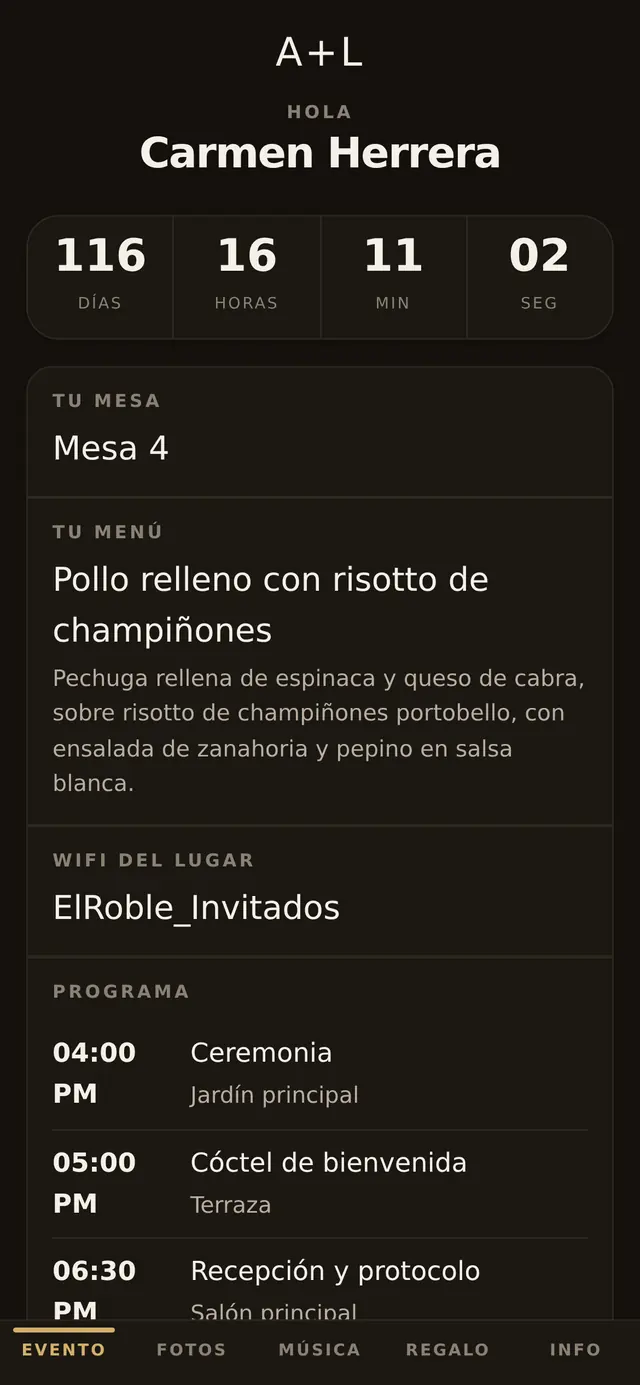
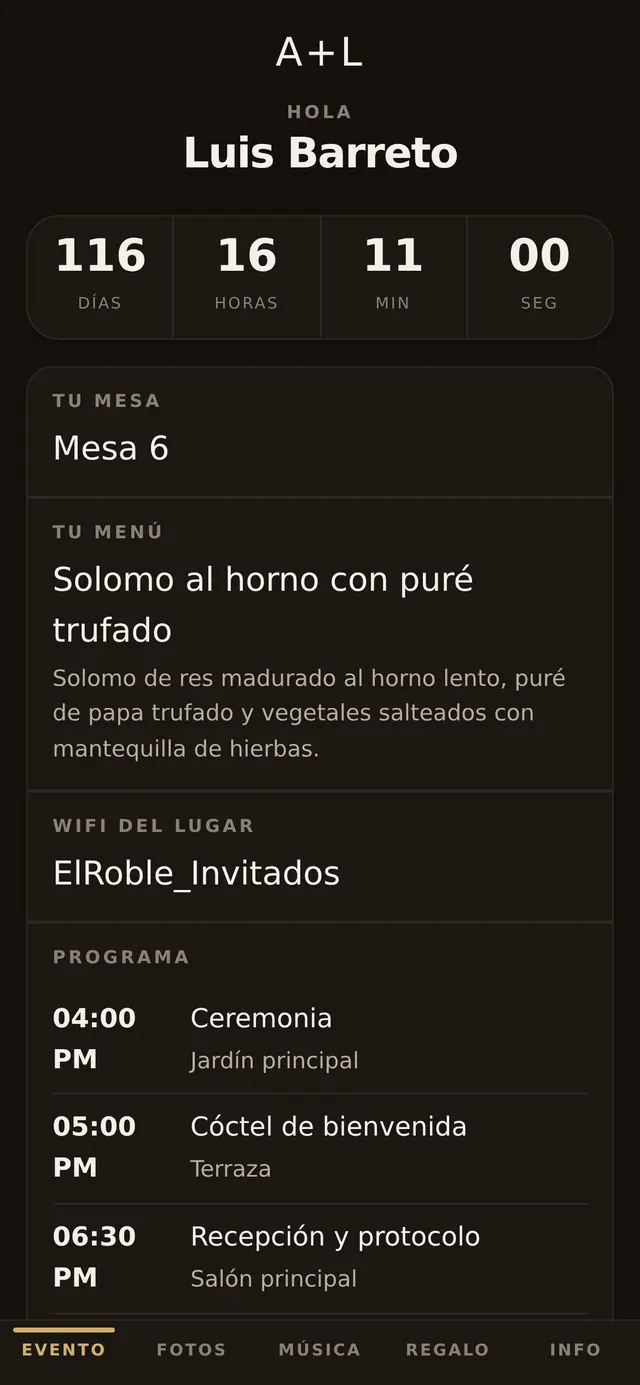
Carmen opens her link and sees her table, her plate —stuffed chicken, gluten free— and the wifi password with a button to copy it. Luis opens his and sees table 6, the sirloin and that he is bringing a plus-one. Neither of them sees the guest list, or anyone's phone number, or anyone's email. And neither installs anything: it is a link that opens from WhatsApp.
Your guests' photos that same night, not in a WhatsApp group
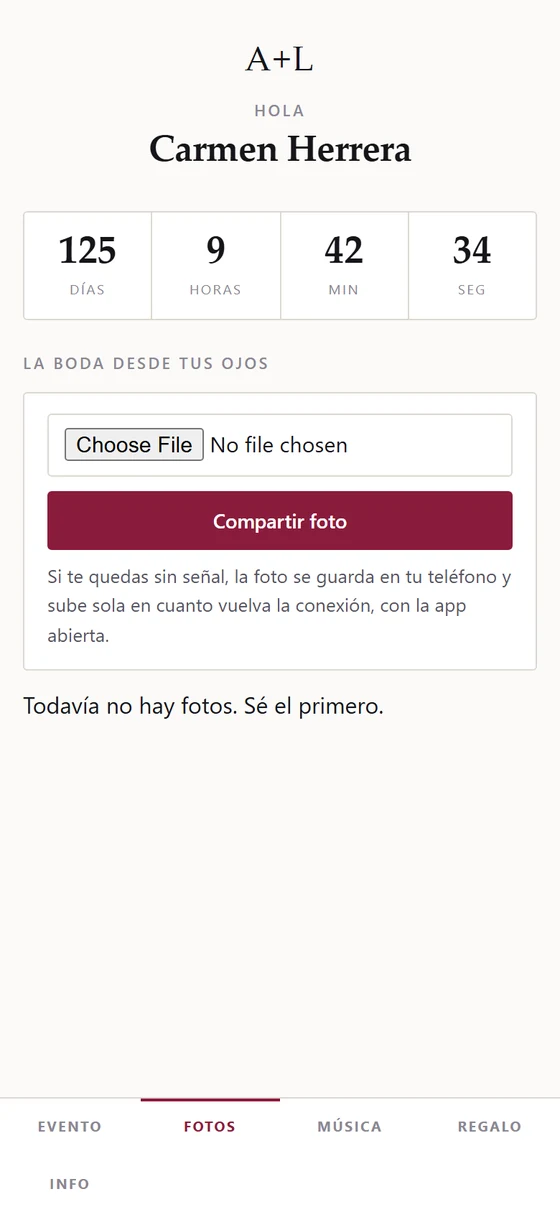
The photographer takes two to five months. Your guests have the good ones that same night, and today they end up split across three WhatsApp groups, compressed, mixed in with voice notes and gone within a week.
Here each guest uploads them from their own link, they all stay in one place, and they download at full size whenever you want. Four things worth knowing:
- The location is stripped from every photo. The phone stores the coordinates of where the picture was taken inside the image itself. We remove them before saving, always. None of the apps we checked says so on their page.
- They survive bad signal. If the guest loses coverage, the photo is kept on their phone and uploads on its own as soon as the connection is back. At a country venue outside town that is the difference between having photos and not having them.
- Everyone deletes their own. Nobody can delete somebody else's photo; you, from the panel, can pull any of them.
- Nothing to install. It is the same invitation link.
How to get there
Waze, Google and Apple, by coordinates. At a country venue with no street address, that is the difference between arriving and driving in circles.
It saves to their home screen
With your event's monogram and your colors, not with our logo.
Your list is never on show
There is no public name search. The system answers the same whether the guest exists or not, on purpose.
How it looks
The digital invitation with RSVP, in 120 combinations
It is the same wedding six times: the same event, the same list and the same data. What changes is the background, the color and the type. You pick them from three dropdowns in the setup screen and there is nobody to call: 3 backgrounds × 8 colors × 5 typefaces, which is 120 different combinations. The monogram, your logo, the cover photo and which modules you switch on go on top of that.
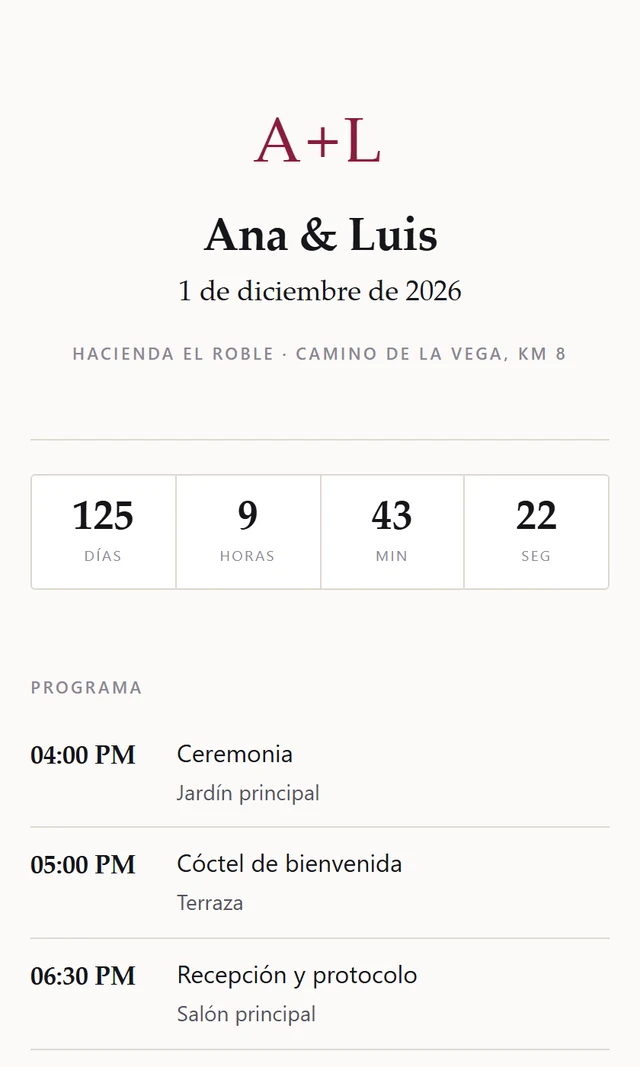
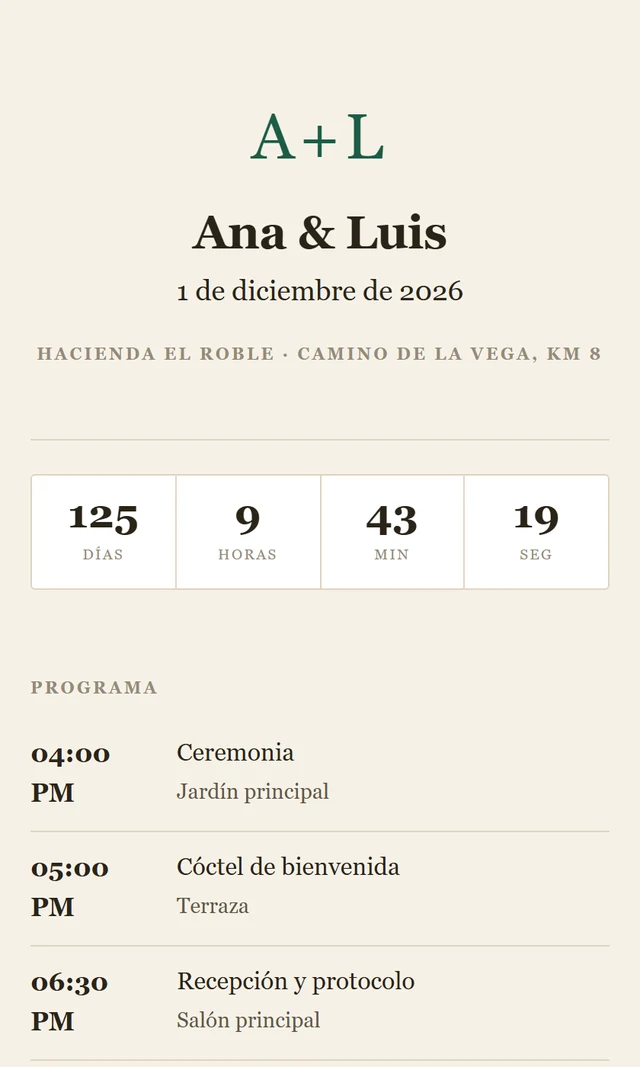
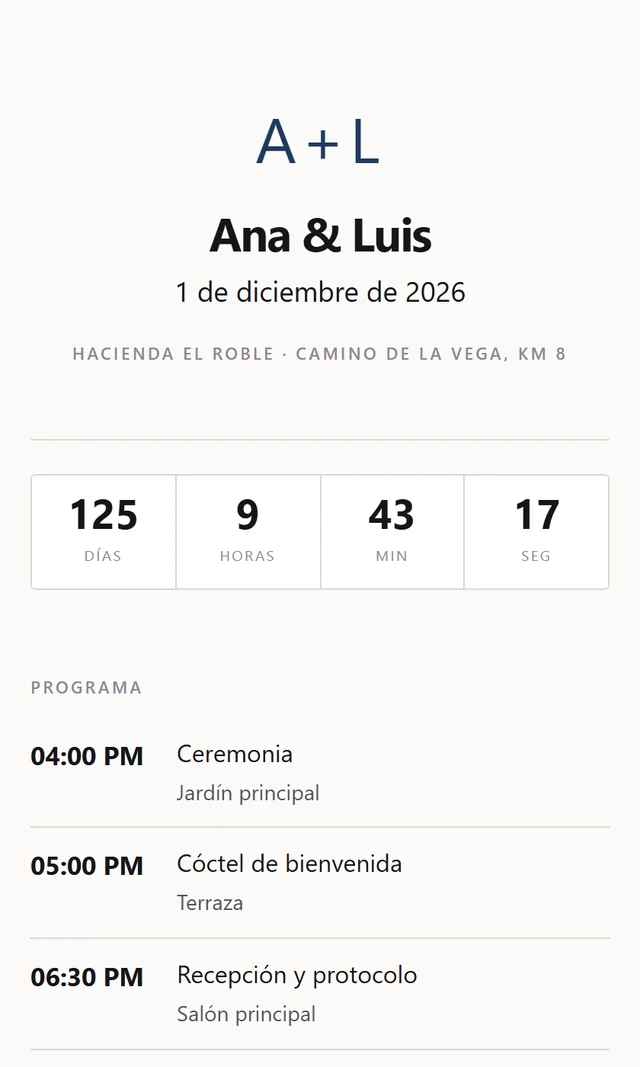
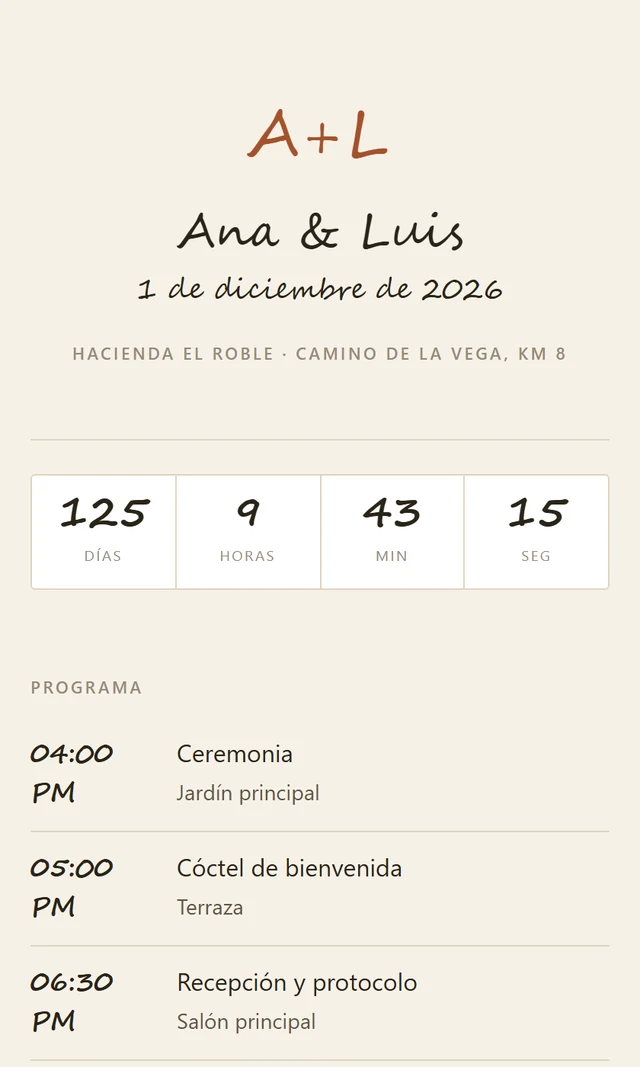
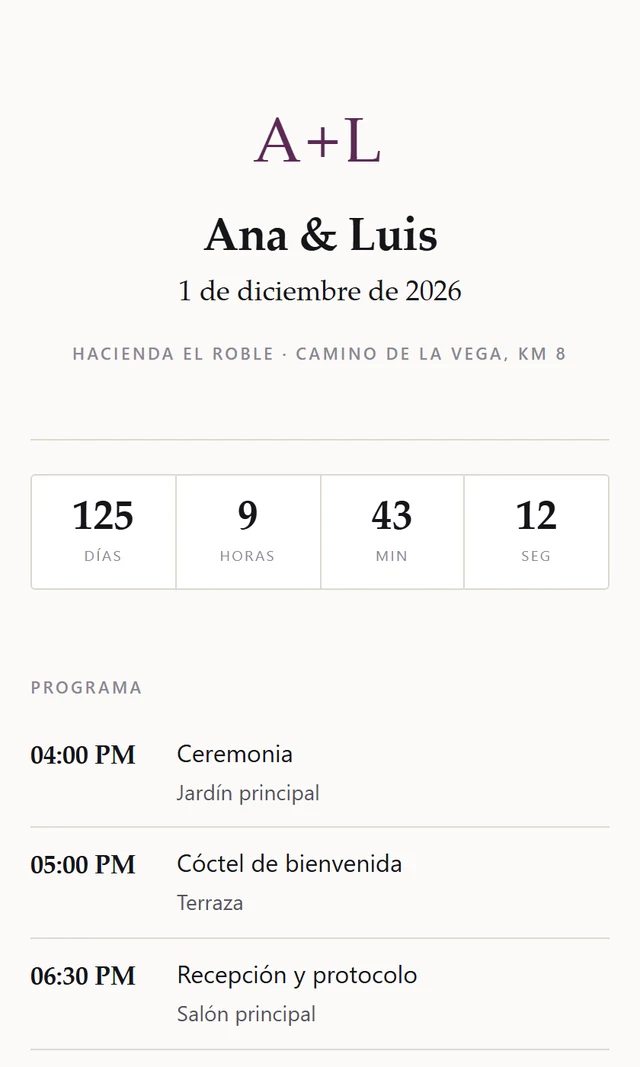
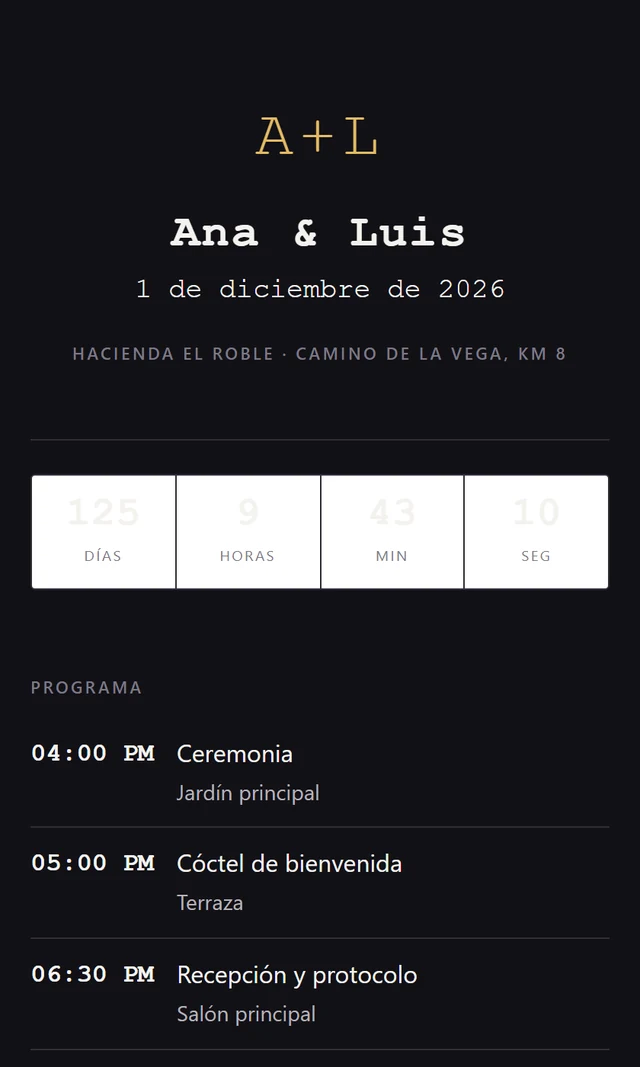
Type your names and look at it
It opens free, with one event and up to 60 guests. No card.
We are not a catalog of three hundred designs yet. We are six combinations that actually look good, and one single look: paper, hairline rules and flat color. If you are after glitter, we are not it.
Compared
What changes against what you are already doing
Swipe →
| Today: spreadsheet and WhatsApp | A 19-to-35 USD digital invitation | Garvela | |
|---|---|---|---|
| Confirmations | You chase them yourself, one by one | It collects them on its own | It collects them on its own |
| Menu and allergies | In a chat and in a notebook | Usually collects it | Comes out printed for the kitchen, with name and date |
| Table plan | Paper, Canva, or done again | Even some free ones have it | You drag it, and one drop-out does not force a redo |
| DJ list | You rebuild it from the chat | Does not hand it over | One sheet, with nobody's phone number on it |
| Setup floor plan | Printed and then fixed in pen | Does not hand it over | One sheet, updated to the last change |
| What your guest sees | A PDF with the address | The invitation | Their table, their plate, the wifi and how to get there |
| Door check-in | A printed list and a pen | Does not have it | You scan the code and the arrival time is recorded |
| Guest photos | Three WhatsApp groups, compressed | Some have a gallery | All in one place, with the location stripped out, and they upload even with no signal |
| Who touched what | Nobody knows | Does not record it | It is written down, with the time, and it is not erased |
| If you leave | It is yours, it is in your spreadsheet | It ends with the event | You take everything out in CSV the day you want |
| Several events a year | You start from zero every time | Paid for one by one | One license, however many events you run |
The middle column exists and it is good at what it does. If all you need is a nice invitation and to be told who is coming, buy it: it will cost you between 19 and 35 dollars and you will be fine. We start where that ends, which is the Thursday.
And yes: there are free wedding sites — bodas.net, Joy, The Knot — that already give you confirmations, a guest list and even a printable table plan. If your event fits there, use them. What they do not give you is the sheet the kitchen takes on Thursday, or each guest's own link with their table and their plate.
Price
You pay per event, per year or per two years. You pick whichever suits you.
Free
- One event, up to 60 guests
- The whole product: invitation, confirmations, tables and guest app
- The three PDFs for your suppliers
- “Made with Garvela” at the foot of the three sheets. Nothing of ours shows on your invitation
Your event
- No limit on guests, for real: no tiers at 120, 350 or 800
- None of our branding anywhere
- The three sheets and the table plan
- It is not a subscription and it does not renew on its own
If your venue works with Garvela, you pay nothing: they hand it to you already set up.
Planner
- However many events you run, no limit, and no cap on guests
- Your logo on the invitation, in the guest app and on the three sheets
- You import your list from Excel or CSV
Which means: at forty events a year it works out at 10 dollars per event, and you stop building every wedding from scratch.
Talk about this oneWhite label
- Your whole brand and your own domain: Garvela shows up nowhere
- The right to resell it to your clients as an extra of yours
- Everything in the plan before this one, and training for your team included
Which means: a bit over 29 dollars a month for two years. A designer today charges between 100 and 143 dollars to hand-build one invitation with fewer features than this, and that is the price you get to set.
Talk about this oneSetup · 190 USD, optional. Included at no cost with White label. We put your branding in, load your first event with your real list and train your people. If you would rather set it up yourself, you do not pay for it.
Not included
We do not send the emails or the WhatsApps to your guests: the link gets shared from your phone, with a button. There is no Spotify integration. There is no lodging module and no transport module. There is no payment gateway and no collecting of contributions. We do not do the graphic design of your stationery.
What it does do now
Check-in at the door: you scan the guest's code, their arrival time is recorded, and if they lost the link you find them by name at the entrance. It is from August 2026; until it existed, this box said we would not sell it.
What it does not do yet
We are not going to promise you that people will confirm: software does not fix that, you do. What it does do is that when they answer, you do not have to write it down.
The guarantee
If the platform goes down on the day of your event and your guests cannot open their link, we give you back what you paid, all of it. And you already have the three sheets printed from the day before: paper does not go down.
Questions
What people ask us before deciding
What about my grandparents? They are no good with technology.
They do not have to handle anything: it is a link that opens on its own, with no sign-up and no password. And for the ones who still will not open it, print them the invitation on paper and confirm them yourself from the panel in two taps. The system does not require everybody to go through it.
I already send the invitation on WhatsApp. What is this for?
Keep sending it on WhatsApp. What changes is not how you send it, it is what happens next: who answered, what they eat, where they sit and what comes out printed for the caterer. Today you are doing that by hand.
How is it different from a 19-to-35-dollar digital invitation?
In the Thursday. The invitation is done once people confirm. We start there: tables, menu counts, allergies and three sheets for your suppliers. If you do not need that, the cheaper one will do and we honestly recommend it.
Can I try it with a real event before paying?
Yes. The free plan is the whole product with one event and up to 60 guests. We do not ask for a card and the account opens on its own, without talking to anybody.
How long does it take me to get my first event set up?
It is nine steps and you can publish with the bare minimum —name, date and place— and fill in the rest later. If you would rather not touch it, we set it up with your list: that is the setup service.
What if there is no internet at the venue on the day?
The three sheets are printed the day before and depend on nothing. The guest app keeps the last screen they opened, so they still see their table and their menu. What needs signal is confirming, and that already happened.
Who answers for my guests' data?
The data is yours and you are the one responsible for it; we process it on your behalf and that is written into the contract. Nobody can search your list from outside: there is no public name search. It is recorded who touched what and when, and that record does not disappear even if the event is deleted.
If I stop paying, what happens to what is mine?
You take everything out in CSV whenever you want, history included. When it expires, your past events stay read-only for 90 days so you can download what you need. We do not hold lists hostage.
Is it any good for something that is not a wedding?
It is built on “event”, not on “wedding”. Quinceañeras, graduations, christenings, anniversaries and company dinners work the same: what changes is the wording and which modules you switch on. And since August 2026 you also run check-in at the door by scanning the guest's code.
We are a parents' committee and we handle family money. Is it any use?
For the list, the tables and the dinner count, yes, and quite a lot. For the money, no: Garvela does not collect contributions and does not keep the committee's books, and we would rather say so now than later.
Get started
Tell me what event it is and I will leave it set up for you
Four fields. We open the account and write to you with your event already created. If you would rather do it yourself, the free plan is above and there is nobody you need to talk to.
I would rather see it in twenty minutes
I show it to you with you there, with your real list if you have it to hand.
Write on WhatsAppIn Venezuela we also answer on +58 424 962 6998, the local Puerto Ordaz number.
I would rather try it on my own
You open the free account, set up your event and pull the three sheets. No talking to anybody and no card.
Open a free accountNot right now, then
I'll email you the three sample PDFs and you look at them in your own time
One email, not a sequence of seven. You get the three sheets from the sample wedding and the demo link, so you can forward it to your partner, your caterer or whoever decides with you. If you would rather write first: contacto@agenciagarvil.com.